Documentation · Curating
Working with tables
A selected table generates a full DAO either way. What the MCP boxes control is which row operations are offered as tools to an agent.
<owner>_<table>_get_by_pk      R
<owner>_<table>_insert         C
<owner>_<table>_update         U
<owner>_<table>_delete         D
<owner>_<table>_<constraint>   R   (one per selected unique key, index or foreign key)
In the config that is TABLE_MCP_CRUD_<i>, as letters. Untick them all to generate the table but
expose none of it.
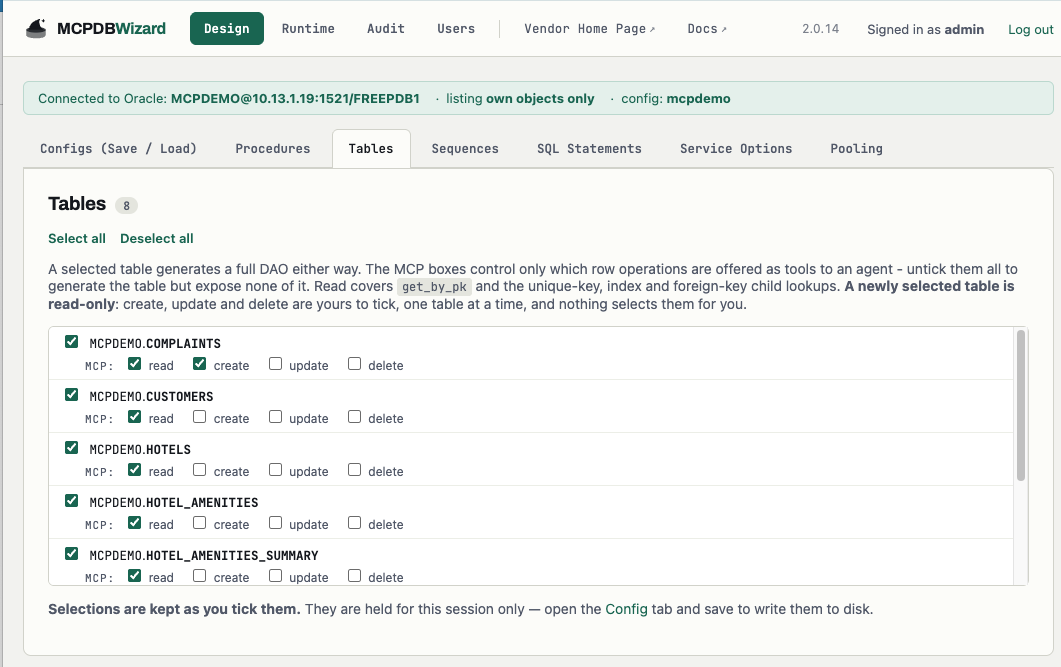
MCP boxes decide which row operations an agent is offered. A newly selected table is read-only — read is ticked and the other three are yours to tick, one table at a time.Think twice before allowing insert, update and delete
A newly selected table is read-only in the console. Create, update and delete are yours to tick, one table at a time, and nothing selects them for you. That default is the advice, made into behaviour.
What to weigh before ticking them:
- What you select is exposed as written. A selected
deletetool deletes. The product’s job is to make the selection reviewable, generate it faithfully and record it — not to second-guess it. updateis a full-row replace, not a patch. An agent that omits a column is not leaving it alone.- A model chose the arguments. Every value crossing into an insert or update was produced by a language model from a conversation you did not see.
- Consider PL/SQL, or a SQL statement, instead. A procedure that performs the write can validate, authorise and log
it, and it is a single tool with a description you wrote. Exposing
inserton a table exposes the table’s shape; exposing a routine exposes an operation. - Back it with the grant. If a table is read-only in the config, do not grant
INSERTon it to the agent’s Oracle account. Then the two answers agree.
Read operations
Ticking read covers rather more than one tool.
By primary or unique key
get_by_pk takes the primary key and returns one row as a JSON object, or {"found": false} if
there is none. Not finding a row is not an error — an agent can act on it.
One additional lookup is generated per unique key you select, named after the constraint. Same shape: at most one row.
By foreign key
A foreign-key child lookup lives on the parent and returns the child’s rows — “give me this customer’s orders” — as an array.
A gotcha worth knowing: because the tool sits on the parent but returns the child’s rows, only readable children are offered. Curating a child read-off would otherwise still surface its rows through the parent’s tool.
By index
Selected indexes generate a lookup each, returning every matching row. Use them where an agent genuinely needs to search on something other than a key — and remember an unselective index means a large result.
Duality views (23ai and later)
JSON-relational duality views get document-shaped tools — <owner>_<view>_doc_get_all and friends —
with optimistic locking on update. A lost lock comes back as document changed: re-read and retry.